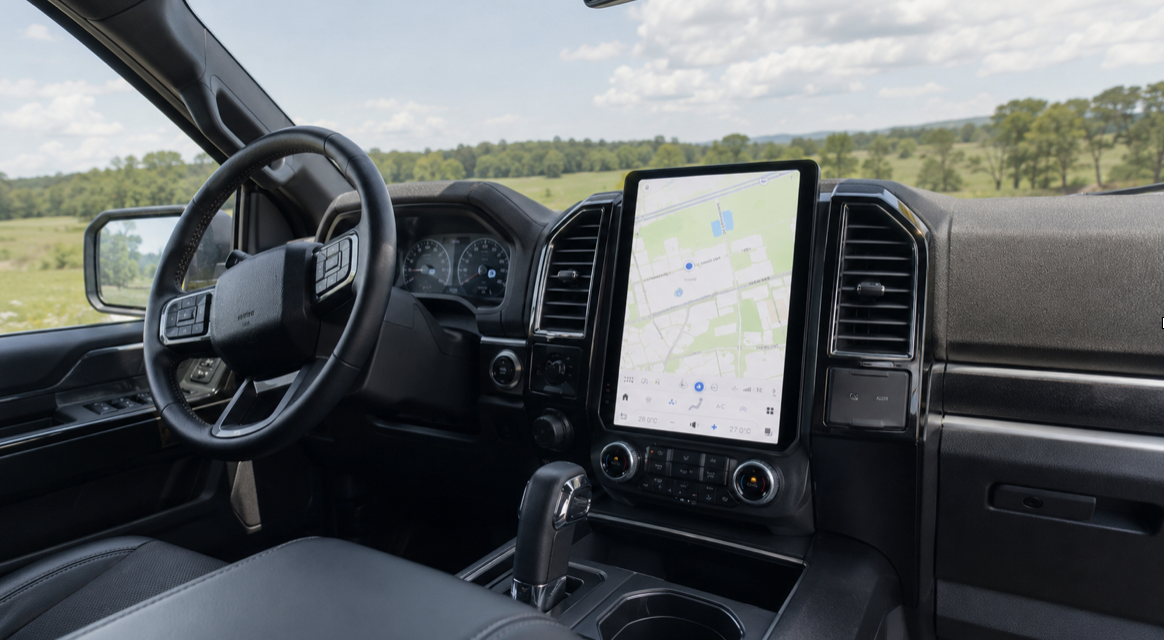

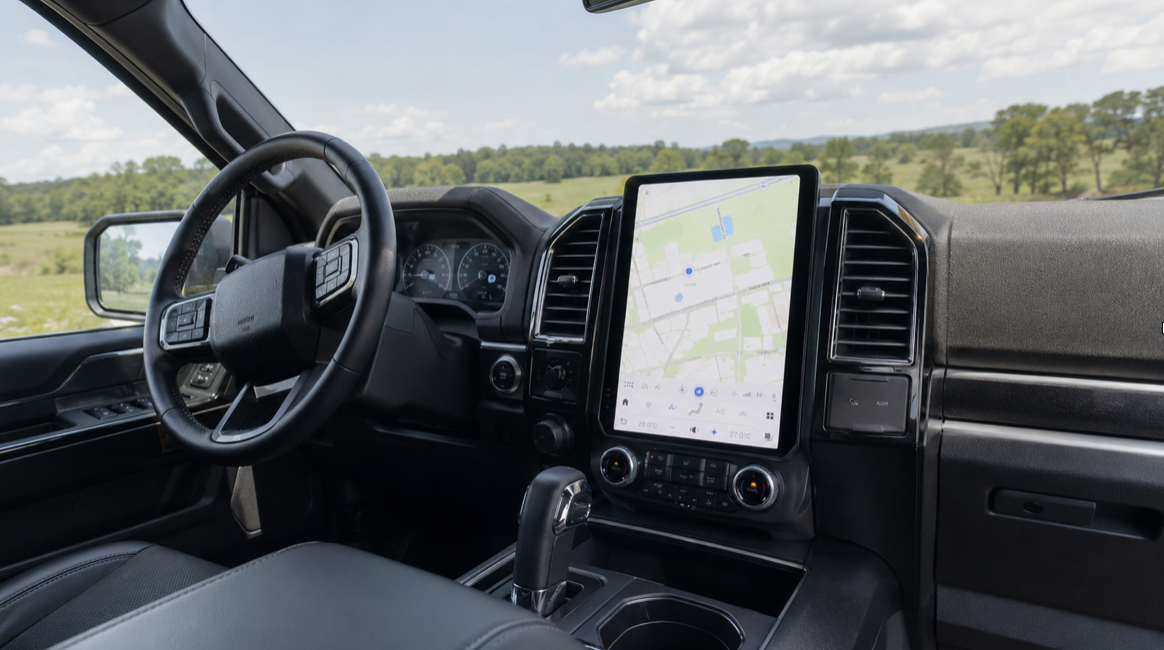
An F150 Tesla screen is a large-format, vertically oriented touchscreen retrofitted into a Ford F-150 to replicate the clean, minimalist interface made famous by Tesla’s in-car technology. If you’ve spent time in a Model 3 or Model Y and found yourself wishing your truck had that same expansive, responsive display, you’re not alone. Plenty of F-150 owners are making this upgrade to modernize their interior without swapping vehicles. The result is a genuinely different driving experience: navigation, entertainment, climate control, and connectivity all consolidated into one polished interface.
Key Takeaways
- This is a retrofit, not a factory option. Tesla-style screens for the F-150 are aftermarket head units engineered to fit the truck’s dash without major modification.
- Screen size and software matter more than spec sheets suggest. A 12.3-inch or larger vertical screen changes how you interact with your truck daily, not just how it looks.
- Compatibility is model-year specific. Not every F-150 generation accepts every screen, so confirming fitment before purchasing is essential.
- The upgrade includes more than a display. Most quality units bundle Apple CarPlay, Android Auto, GPS, and sometimes a built-in dashcam or DSP audio processor.
- Installation difficulty varies. Some owners complete this in an afternoon. Others benefit from professional installation, especially if their truck has factory SYNC integration.
Why F-150 Owners Are Making This Switch
For many years, the Ford F-150 has been the most popular car in the United States. But best-selling doesn’t always mean most satisfying to sit in. Even relatively recent F-150 models ship with infotainment screens that feel small and cluttered compared to what luxury EVs now offer as standard. A 4-inch or 8-inch display made sense in 2015. In 2026, it feels like a compromise.
That’s exactly the gap a Tesla-style screen upgrade fills. Rather than replacing the entire truck, owners are retrofitting a modern, oversized touchscreen that transforms the interior experience. The appeal is straightforward: you get the visual clarity of a large vertical display, the responsiveness of a modern processor, and access to wireless Apple CarPlay and Android Auto, all without touching anything under the hood. For truck owners who spend long hours in the cab commuting, hauling, or traveling for work, that shift in daily experience is hard to overstate.
There’s also a resale angle worth considering. A modernized interior with a high-quality head unit is a visible, tangible upgrade that buyers notice immediately when they sit down. Unlike mechanical work that may go unappreciated, a premium display speaks for itself.
What These Screens Actually Include
The term “Tesla screen” is shorthand in the aftermarket world for a large-format vertical touchscreen, typically ranging from 12.3 to 14 inches diagonally, that mirrors the layout Tesla uses in its vehicles. When you see this descriptor applied to an F-150 upgrade, you should expect a few core features across most quality units.
Wireless Apple CarPlay and Android Auto are typically standard. That matters because wired connections, while reliable, add friction to daily use. A unit that connects your phone the moment you start the truck is a fundamentally different experience than one that requires you to plug in and wait.
Navigation is usually built in, either via Google Maps integration or an embedded GPS system. Climate and audio controls move into the touchscreen interface, which is where opinion tends to divide. Some drivers prefer the tactile certainty of physical knobs. Others appreciate the simplicity of a single unified screen. It’s worth thinking through before you commit.
Higher-end units also include a digital signal processor (DSP) for audio tuning, a built-in dashcam with front and rear camera feeds, and Bluetooth 5.0 or higher for multiple device connections. When you’re comparing options, these are the features that separate a genuinely premium upgrade from a budget screen with attractive packaging.
The Fitment Question: Not Every Screen Works in Every F-150
This is the part that generic content almost always glosses over, and it’s where real-world experience matters most. F-150 buyers span a wide range of model years, trim levels, and factory configurations. A screen engineered for a 2020 F-150 may not drop cleanly into a 2017 model without adapter harnesses or bracket modifications. A truck equipped with factory SYNC 3 or SYNC 4 introduces additional variables around can-bus integration, steering wheel control retention, and amplifier compatibility.
Before purchasing a Tesla-style screen for your F-150, confirm the following: your specific model year and generation, whether your truck uses a factory-amplified audio system, and whether your existing SYNC version will require a bypass or full replacement. Merge Screens’ F-150 Tesla screen is a purpose-built solution designed to address these fitment challenges directly, engineered to integrate with the F-150’s existing wiring and controls rather than fight against them.
Compatibility problems account for the majority of negative reviews in this product category. Most of those problems trace back to buyers purchasing a generic unit built for a range of vehicles rather than one built specifically for their truck. Fitment specificity is worth paying for.
Installation: What to Expect
Installation ranges from a confident afternoon DIY project, to a job that genuinely benefits from professional help. The variables that push it toward professional territory are SYNC integration, factory-amplified audio, and 360-degree camera retention.
For a straightforward install on a non-amplified F-150, the process broadly follows this path: remove the existing head unit and trim surround, connect the new unit to the vehicle’s wiring harness via the included adapter, mount the screen in the dash, and calibrate settings before reassembling the trim. Many owners with basic mechanical confidence complete this without difficulty. The important thing is patience on the wiring connections, and a careful read of the installation guide before you start pulling panels.
Where things get more complex is steering wheel control integration. Most good units let you keep the audio and phone controls on your factory steering wheel, but you’ll need to either use a plug-and-play adapter or go through a short software configuration step to do this. If you skip this and the controls stop working, the fix is usually straightforward, but it is far better to handle it during the initial install than to revisit the dash afterward.
One practical tip that experienced installers consistently mention: photograph every connector and its position before you disconnect anything. This adds five minutes at the start and can save an hour of confusion later.
How This Compares to Leaving Your Factory Screen in Place
It’s worth being direct about what you are trading and what you are gaining, because some owners underestimate both sides.
| Feature | Factory F-150 Screen | Tesla-Style Aftermarket Screen |
| Screen size | 4 to 12 inches (varies by trim) | 12.3 to 14 inches typical |
| Wireless CarPlay / Android Auto | Limited to newer trims | Standard on quality units |
| Interface responsiveness | Moderate, SYNC dependent | Fast, modern processor |
| OTA updates | Ford SYNC updates only | Unit-specific, varies by brand |
| Physical climate controls | Retained | Migrated to touchscreen (most units) |
| Dashcam integration | Not available | Available on premium units |
| Warranty impact | None | May affect related components |
The factory screen is tightly integrated with Ford’s SYNC ecosystem, which has genuine strengths, particularly for owners who use FordPass or tow-focused features tied to factory software. The aftermarket screen replaces the infotainment layer but does not touch powertrain or towing systems. Most owners find the trade worth it. A few, particularly those who rely heavily on native Ford software features, find they miss certain integrations. Knowing this in advance lets you make a clear-eyed decision.
What the Real-World Experience Actually Feels Like
Here is what most product pages skip. The first week after installation, you will probably reach for physical buttons that are no longer there. This is normal and fades quickly. By week two, the muscle memory shifts and the larger screen starts to feel like the obvious way an infotainment system should work.
The navigation experience improves most noticeably on long drives. A 13-inch map display gives you genuine situational awareness that a small factory screen simply cannot match. When you are towing and need to monitor your route for clearance issues or weigh station locations, having that information on a large, bright display at eye level makes a real difference.
Audio quality is another area where the real-world result surprises people. If the unit includes a DSP, the improvement in sound clarity is noticeable even through stock speakers. DSP tuning compensates for cabin acoustics in a way that factory head units rarely do at the same price point.
The one area where some owners report an adjustment period is bright sunlight. Anti-glare screen quality varies across manufacturers, and this is worth asking about specifically when evaluating options. A screen that washes out in direct sun becomes frustrating quickly on a truck that spends serious time outdoors.
Things You Should Know Before You Start
Before you purchase or install a Tesla-style screen for your F-150, there are several practical details that experienced owners consistently wish they had known upfront. These are the points that rarely appear in product listings but make a real difference in your outcome.
- Confirm fitment by exact model year and trim, not just generation. F-150 dash configurations changed across generations and sometimes within the same generation depending on trim. A screen listed as compatible with “2015 to 2020 F-150” may still require additional brackets or adapters for specific trims like the Platinum or Limited.
- Amplified audio systems need a specific bypass solution. If your F-150 came with a factory Sony or B&O audio system, the new unit must interface correctly with the factory amplifier or audio quality will degrade significantly. Confirm this before purchasing.
- Steering wheel controls are retainable but not automatic. You will typically need a steering wheel control adapter (often included with quality units) and a brief configuration step. Do not assume this works out of the box without checking.
- Backup camera integration requires attention. If your truck has a factory backup camera, verify that the new screen supports direct integration. Some units require the camera feed to be routed through a separate input, which can affect image quality or delay.
- Climate controls move to the screen on most units. This is a significant ergonomic change for some drivers. If you frequently adjust temperature while driving without looking, plan for an adaptation period.
- Screen brightness settings matter for day and night use. Most quality units include automatic brightness adjustment. Confirm this is present, because a screen that cannot dim sufficiently at night becomes a safety distraction.
- Warranty considerations apply to related components. Installing an aftermarket head unit generally does not void your entire vehicle warranty, but it may affect Ford’s warranty coverage for directly related electrical components. If your F-150 is still under factory warranty, it is worth understanding where that line sits.
Frequently Asked Questions
Will a Tesla-style screen work with my F-150’s factory backup camera?
In most cases, yes, but it depends on the specific unit and how it handles camera inputs. Quality aftermarket screens designed for the F-150 include a dedicated backup camera input and trigger the feed automatically when you shift into reverse. However, factory cameras that output through the SYNC system may require an adapter to work correctly. Always confirm camera compatibility before purchasing, especially if your truck has a 360-degree camera system.
Do I lose Ford SYNC features when I install an aftermarket screen?
You replace the SYNC infotainment interface, but you do not lose access to vehicle data or core functions. Features like navigation, audio, and phone connectivity are handled by the new unit, typically with a better interface. However, some Ford-specific SYNC features, such as FordPass connectivity or certain towing profile screens, may no longer be accessible. If those features are central to how you use your truck, factor that into your decision.
How long does installation take?
Most straightforward installs take two-to-four hours for someone with basic mechanical confidence. More complex installations involving amplified audio systems, steering wheel control adapters, or 360-degree camera retention can take longer. If you are not comfortable working with automotive wiring, professional installation by a car audio shop is a reasonable choice and typically takes less than a full day.
Is the Tesla-style screen for the F-150 a plug-and-play installation?
Units built specifically for the F-150 come much closer to plug-and-play than generic screens. Purpose-built units like the one from Mergescreens include vehicle-specific wiring harnesses and mounting hardware, which removes most of the guesswork. That said, “plug-and-play” should be understood as significantly simplified rather than truly zero-effort, particularly for trucks with factory-amplified audio.
Will this upgrade void my F-150’s warranty?
Installing an aftermarket head unit does not automatically void your entire vehicle warranty. The Magnuson-Moss Warranty Act says that a manufacturer has to show that an aftermarket part caused a particular failure before they can refuse to cover that part under the warranty. However, any Ford warranty claims directly related to the infotainment or electrical system connected to the new unit may face additional scrutiny. Consult your dealership if your truck is still within its factory warranty period.
What screen size should I expect on an F-150 Tesla-style upgrade?
Most purpose-built F-150 Tesla-style screens range from 12.3 to 14 inches diagonally. The exact size that fits cleanly depends on your specific dash configuration and the unit you choose. Larger screens provide a more immersive navigation and media experience, but the fit must be verified for your trim level to ensure the surround and mounting align correctly.
Does wireless Apple CarPlay and Android Auto come included?
Yes, on any quality unit in this category, wireless Apple CarPlay and Android Auto are standard features. Wired connections are typically supported as well, which is useful as a fallback. If a unit you are evaluating does not include wireless connectivity, it is worth questioning whether it is truly a current-generation product.
A Meaningful Upgrade for the Right F-150 Owner
A Tesla-style screen for the F-150 is not a cosmetic novelty. For owners who spend serious time in the cab, who value modern connectivity, or who simply find their factory display frustrating to use, this is a genuine quality-of-life improvement. The navigation clarity alone changes long-distance driving. Add wireless CarPlay, a DSP-tuned audio system, and an integrated dashcam, and you have a truck interior that competes with vehicles costing significantly more.
The key is buying a screen that was built for your specific truck rather than a generic unit adapted to fit. Fitment-specific engineering is what separates a clean, reliable upgrade from an installation that creates more problems than it solves. Merge Screens specializes in exactly this kind of purpose-built vehicle integration, designing screens to work with the F-150’s existing systems rather than around them.
If you have been sitting on the fence, the practical next step is simple. Confirm your F-150’s model year and trim, check compatibility with the unit you are considering, and make the upgrade. The difference between looking at a dated factory screen every morning and sitting down to a large, responsive display is more significant than most people expect until they experience it firsthand.